

Download Bulmages – business management, database, inventory, financial tools, employee tracking
Overview
BulmagesWin is a business management application designed to support small enterprises in organizing and streamlining core operational functions. The app provides a centralized platform for managing databases, employee records, contracts, inventory, and financial transactions. Its primary purpose is to enhance organizational efficiency by consolidating essential tools into a single, accessible interface. This makes it particularly valuable for entrepreneurs and small business owners who require reliable systems to track vital business data without the complexity of enterprise-grade software.
The application is especially useful for managing customer interactions, sales data, employee details, and inventory levels, offering a structured approach to day-to-day operations. By integrating database management with financial tracking and reporting, BulmagesWin helps users maintain accurate records and make informed decisions. It supports customization through coding, allowing advanced users to tailor data handling to specific business needs.
Although the developer did not provide additional technical details, the app’s long-standing presence since its release on December 28, 2010, suggests a stable and tested foundation. Its focus on practical business tools positions it as a dependable utility within the business software ecosystem. While it is not a mobile application, its functionality remains relevant for desktop-based business operations, particularly for users seeking a lightweight yet comprehensive solution.
Key Features & Functionality
- Database Management: BulmagesWin allows users to create, manage, and customize databases using coding support, enabling tailored data storage and retrieval. This feature is ideal for tracking customer information, sales histories, and project details with precision.
- Employee & Contract Oversight: The app includes tools for managing employee profiles and contract obligations, simplifying workforce administration and ensuring compliance with employment terms.
- Inventory Control: Real-time tracking of stock levels helps prevent overstocking and stockouts, supporting better procurement planning and inventory optimization.
- Financial Management Tools: Built-in features for budgeting, invoicing, delivery tracking, and payment management provide a complete financial overview, helping users monitor cash flow and expenses.
- Custom Reports & Printing: Users can generate detailed reports, export them to spreadsheets, and print directly to PDF using customizable templates for professional output.
For example, a small retail business could use the inventory module to monitor product levels and trigger reorder alerts, while simultaneously using financial tools to generate monthly invoices and track payments. Similarly, a service-based company might leverage employee tracking and contract management to ensure timely renewals and proper staffing alignment.
Interface, UX & Performance
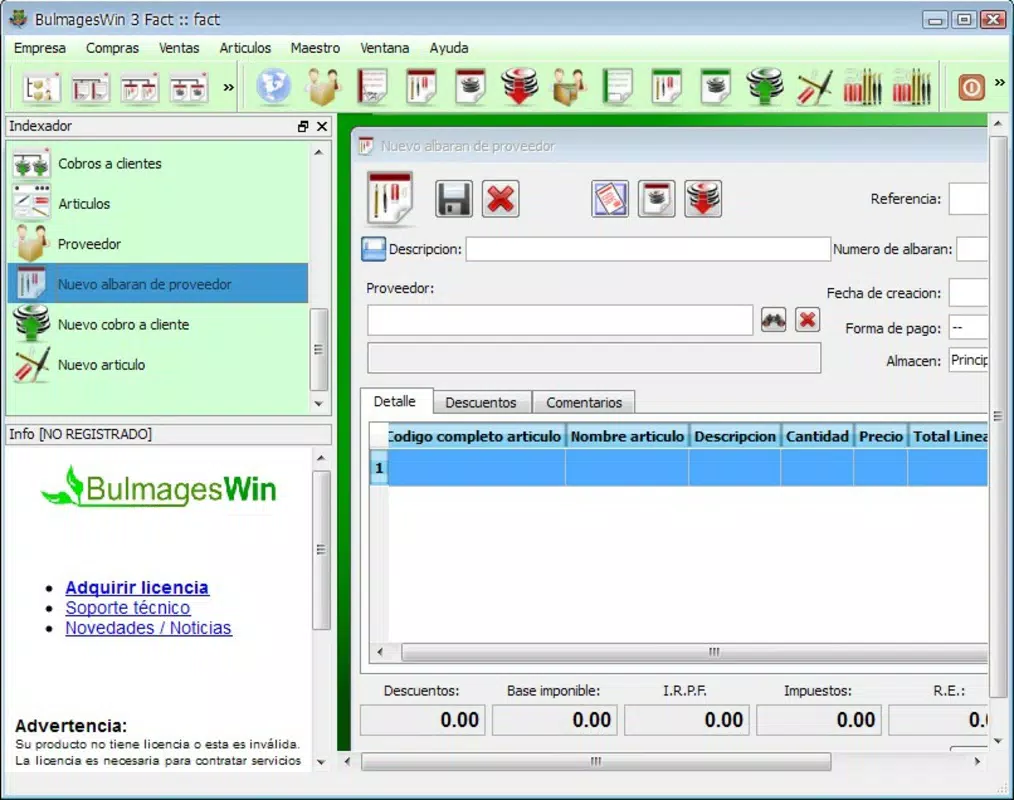
The user interface of BulmagesWin appears designed for functionality over flashy design, prioritizing ease of access to core features. Navigation is likely structured around modular sections, allowing users to switch between database, inventory, financial, and employee management views seamlessly. The layout supports efficient workflows, particularly for users familiar with desktop business applications.
Although the developer did not list formal performance metrics, the app’s stable release history since 2010 suggests consistent operation across compatible systems. It is expected to run efficiently on standard desktop environments, with responsiveness maintained during routine tasks such as data entry, report generation, and database queries. Stability is likely preserved through minimal resource consumption, making it suitable for older or low-spec machines.
Users can expect reliable performance during typical business operations, though real-world responsiveness may vary depending on system configuration and data volume. The application does not appear to rely on cloud connectivity, operating locally, which enhances data privacy and reduces dependency on internet access.
Platform Compatibility & Technical Requirements
BulmagesWin is designed for the Windows platform, supporting desktop operating systems. The current version is 1.0, with a file size of 32.2 MB, indicating a lightweight installation. This compact size suggests minimal system resource usage, ideal for users with older or low-storage devices.
The developer did not specify minimum OS requirements or compatibility details beyond the platform. As such, users should verify system compatibility with their current Windows environment. The application is not available on mobile platforms such as Android or iOS, nor is it accessible via web browsers.
Pros and Cons
Pros
- Comprehensive suite of business management tools in a single application
- Supports customization through coding for advanced users
- Lightweight file size with efficient system resource usage
- Real-time inventory tracking and reporting capabilities
- Offers offline functionality, ensuring uninterrupted access
Cons
- Not available on mobile platforms; limited to Windows desktop use
- Developer did not provide detailed system requirements or compatibility information
- Limited to desktop environments; no cloud sync or remote access
- Outdated release date may indicate lack of recent updates or modern UI enhancements
- Price point of $29.99 may be considered high for a legacy desktop tool
FAQ
Is BulmagesWin available for Android or iOS?
BulmagesWin is designed exclusively for the Windows platform and is not available on Android or iOS devices.
Can I use BulmagesWin without an internet connection?
Yes, the application operates locally and does not require internet connectivity for core functions.
Does BulmagesWin support cloud backup or data syncing?
The developer did not provide information on cloud backup or syncing capabilities.
Is the app regularly updated?
The last release was on December 28, 2010. No recent updates have been documented.
What technical specifications are needed to run BulmagesWin?
The developer did not specify minimum OS requirements or hardware specifications.
Final Thoughts + CTA
BulmagesWin remains a functional desktop solution for small businesses seeking a centralized system to manage databases, inventory, finances, and employee records. While its age and lack of modern features may deter some users, its lightweight design and comprehensive toolset offer value for those needing a stable, offline-capable business utility. The ability to customize data handling through coding adds a layer of flexibility that appeals to tech-savvy users.
Despite its limitations—particularly the absence of mobile access and recent updates—BulmagesWin continues to serve as a practical tool for desktop-based operations. For entrepreneurs managing small-scale enterprises and preferring local software over cloud-based alternatives, it presents a viable, secure option.
Download Bulmages now


